See your screen
differently.
A new layer of neural detail.
For your games, your videos, your Windows desktop.
WINDOWS 11 · NVIDIA GPU · EXPERIMENTAL PREVIEW


 Your picture. Your call.
What am I looking at?
An original AI-generated scene, then processed through NeuralFlow. The comparison uses prepared images; the website does not run neural inference. Demo blend controls the visibility of the recorded result.
Processing settings are recorded with the demo asset.
View demo provenance ↗CAPTURED GAMEPLAY / ACTUAL NEURALFLOW OUTPUT
See it in motion.
Ten seconds of Vice City, captured in a browser. The same moment, side by side—original and NeuralFlow.
Recorded gameplay, processed frame by frame before playback. This demonstrates offline output, not live performance or native game-integrated DLSS. The clip is silent; no additional visual enhancement was added during editing.
01 / A DIFFERENT WAY TO LOOK
A little more atmosphere.
A lot more control.
Explore how neural processing changes your picture. Keep the look you like. Switch back whenever you want.
Your world.
A different finish.
Choose an application window or an entire display. NeuralFlow adds an experimental neural correction over the captured image, with the original always a shortcut away.
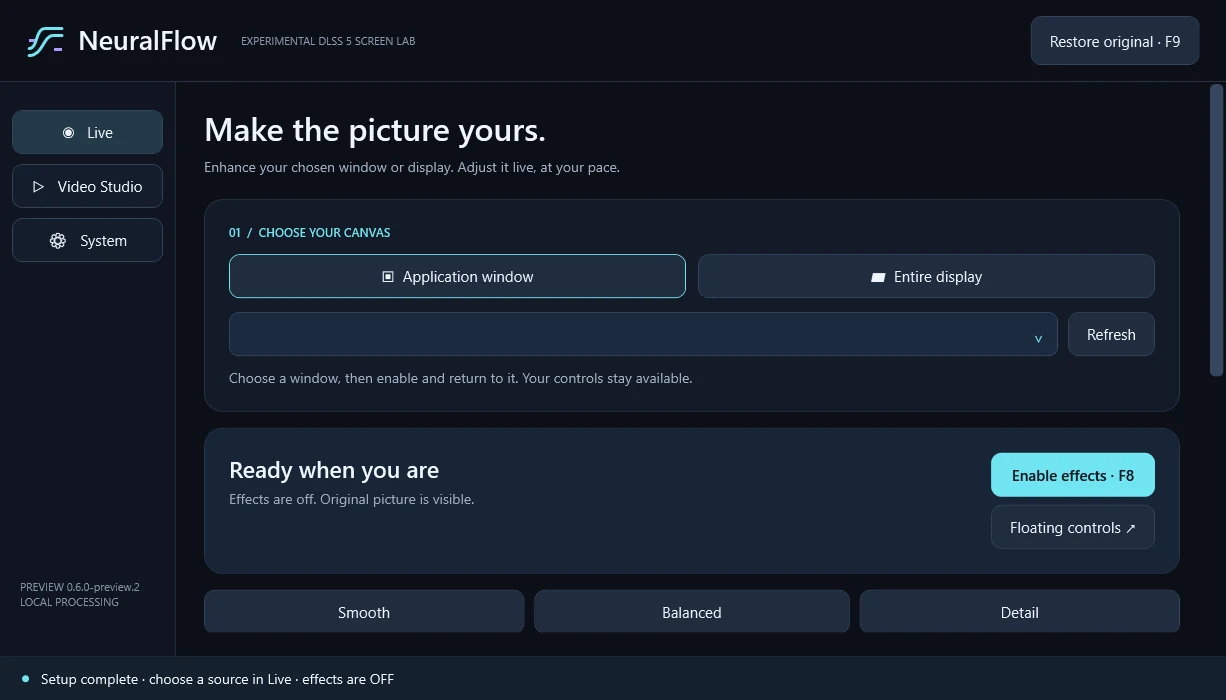 Your desktop stays yours.
Find your
sweet spot.
Adjust neural strength and stability, then shape the finish with clarity, vibrance, contrast and warmth. Prefer a starting point? Try Smooth, Balanced or Detail.
Lower strength changes the look, not the cost of each neural evaluation. Results and responsiveness depend on your hardware.
Let it render.
Then settle in.
For local video, trade waiting time for a prepared result. Render first, then watch with synchronized original and enhanced comparison.
Your original file stays untouched. Temporal stabilization reduces changing detail; it is not a guarantee of flicker-free output.

02 / LESS SETUP. MORE EXPLORING.
Three steps.
No DLL hunting.
- 01
Install NeuralFlow
Download the Windows installer, or unpack the complete portable ZIP.
- 02
Click “Complete setup”
We verify the included neural components and video tools, then check your GPU. No extra downloads.
- 03
Make it your picture
Select a window or display, enable effects and adjust the look. Everything starts OFF.
BUILT TO EXPERIMENT. CLEAR ABOUT THE LIMITS.
Know your setup.
This is an independent experimental preview, with compatibility checked on your own machine. If neural evaluation fails, clarity and color controls remain available in non-neural mode.
Complete installer: all neural and video components included. Allow 1 GB of free space for setup. An installed compatible NVIDIA driver is required.
Read the full test notes ↗A FEW THINGS WORTH KNOWING
Before you dive in.
Is this native DLSS 5 for every game?
No. NeuralFlow uses a community-modified experimental neural runtime with screen capture and overlay composition. It does not add native game-integrated DLSS support and is not endorsed by NVIDIA.
Will it run without delay?
Neural processing takes time. The app keeps the newest captured frame instead of building a live queue, but enhancement can lag and results vary by GPU and content. Offline video rendering prepares the result before playback.
Do I have to find the files myself?
No. The complete installer includes neural components and video tools. System → Complete setup verifies their hashes and tests your GPU. No separate component downloads or manual DLL copying are needed.
Does my screen leave my computer?
NeuralFlow processes captured images and videos locally. The complete package needs no component downloads during setup. This landing page has no uploads, accounts or analytics.
Why might Windows flag the installer?
The preview installer is unsigned, so Windows may identify it as an unrecognized application. The release includes source code, third-party notices and checksums for inspection.
What can’t it capture?
Protected video, secure desktops and HDR are not supported. Exclusive fullscreen applications may not work with a capture overlay. Use a compatible windowed or borderless view.
A NEW PERSPECTIVE IS A CLICK AWAY.
Make it your picture.
Download NeuralFlow ↗Experimental Windows preview. NVIDIA GPU required for neural processing.